Hands-on · Chapter 29 of 69
Kiro CLI Guide
Install kiro-cli, drive sessions with slash commands, manage agents and context, and take the agent into scripts and CI.
All levels 19 min read last reviewed 2026-10-21
◎ Learning objective
Run productive Kiro sessions in the terminal: install, converse, manage context and sessions, switch agents, and know where headless automation fits.
The CLI is the same Kiro brain in a different body: everything is text, everything is scriptable, and it works anywhere a terminal works (laptops, servers, containers, CI).
(Historical footnote that explains a lot of old blog posts: Kiro CLI evolved from Amazon Q Developer CLI in late 2025; q still works as an entry point. Details in History.)
Install and first session
On macOS or Linux:
curl -fsSL https://cli.kiro.dev/install | bashOn Windows, the CLI requires Windows 11 and installs from PowerShell or Windows Terminal (not Command Prompt):
irm 'https://cli.kiro.dev/install.ps1' | iex(Linux also has AppImage, .deb, and zip packages if you’d rather not pipe to bash; see the official install page.) Then, inside any project directory:
kiro-cliThe install finishes with a browser-based sign-in. Complete it and you’re ready. On your first session, try /guide: it starts the CLI’s built-in onboarding agent, which answers “how do I…” questions about your own workflows.
The session toolkit
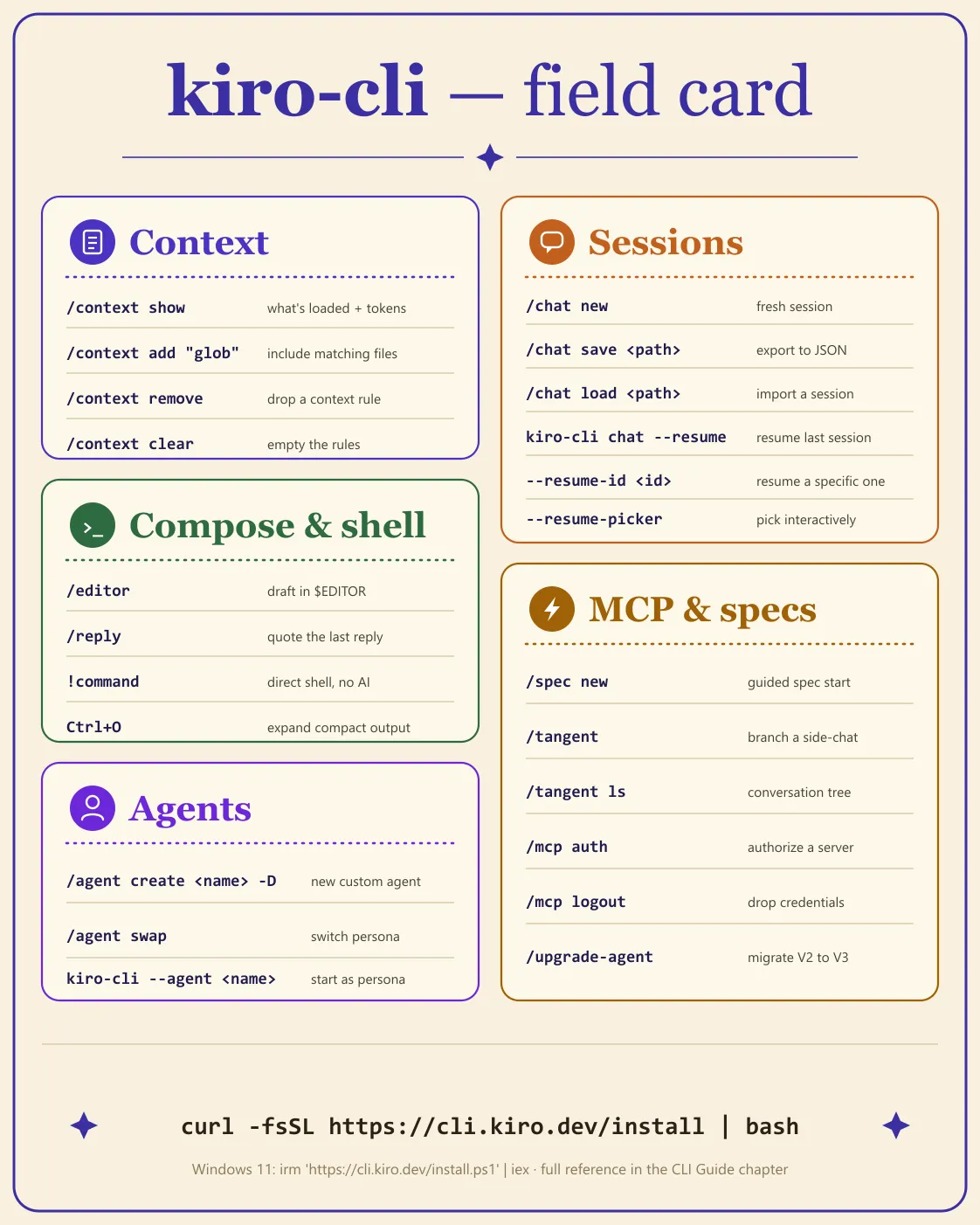
Everything below is a verified command. Learn the left column; the right column is why you care.
Context (control what the agent sees):
| Command | What it does |
|---|---|
/context show | Show what’s loaded and its token usage (per tool since v2.16) |
/context add "src/**/*.py" | Include files matching a glob |
/context remove | Drop a context rule |
/context clear | Empty the context rules |
Conversations (make sessions durable):
| Command | What it does |
|---|---|
/chat new | Fresh conversation (current one is saved) |
/chat new "review the auth module" | Fresh conversation with an opening prompt |
/chat resume | Return to the previous session |
/chat save notes/session.json | Export the conversation to JSON |
/chat load notes/session.json | Import a saved conversation |
Resuming from the shell:
| Command | What it does |
|---|---|
kiro-cli chat --resume | Resume this directory’s last session |
kiro-cli chat --resume-id <SESSION_ID> | Resume a specific session |
kiro-cli chat --resume-picker | Pick interactively |
Choosing a harness for one run (v2.21.4+):
| Command | What it does |
|---|---|
kiro-cli --v2 | Run this session on the V2 agent harness |
kiro-cli chat --v2 | The same flag on the chat subcommand |
The flag applies to that run only: it takes precedence over your saved default without overwriting it. That is what makes it a diagnostic rather than a setting. When something that worked last week stops working, start one session with --v2 and see whether the behaviour comes back; if it does, the cause is the harness rather than your prompt, your steering, or your MCP servers.
Cloud sessions (v2.17.0+, preview):
| Command | What it does |
|---|---|
kiro-cli --cloud | Run the session in a managed AWS sandbox instead of on your machine |
kiro-cli --cloud --repo <repo> | Attach a repository at creation (or use the /repo picker) |
kiro-cli chat --resume-id <id> | Reattach to a cloud session from any machine |
The point of a cloud session is that closing the terminal does not stop the agent. Start one, disconnect, reattach later from a different machine, and the transcript replays where you left off. It needs a paid plan and currently runs in US East only; enterprise administrators have to enable it, because cloud sessions ship opt-in for organizations (v2.18.0). The full set of preview limits is in Core Concepts.
Composing and escaping:
| Command | What it does |
|---|---|
/editor | Draft a long prompt in your $EDITOR |
/reply | Open the editor quoting the last assistant message |
/voice (or hold Space) | Dictate a prompt; transcription runs on-device with Whisper (v2.18.0) |
!npm test | Run a shell command directly, no AI in the loop |
Ctrl+O | Expand compressed (head+tail) command output |
MCP and specs:
| Command | What it does |
|---|---|
/mcp auth | Manage MCP server authentication |
/mcp cancel-auth | Cancel pending MCP authentication |
/mcp logout | Remove saved MCP credentials |
/spec new | Start a new spec with a guided description step |
/spec run | Open the full-screen task execution view: pick the task scope, then watch progress live (v2.20.0, V3 spec runs) |
Ctrl+X (at a spec phase checkpoint) | Open the spec review screen: read the phase document in place and stage line comments (v2.18.0; mouse scroll and click added in v2.19.0) |
/tangent | Branch into a side-conversation (inherits full history) |
/tangent ls | Visual picker for conversation tree navigation |
/upgrade-agent | Migrate a V2 custom agent config to V3 format (/upgrade-agent diagnostics lists permission warnings) |
/memories | Choose memory access (config) or browse stored memories (list); local V3, v2.29.0 |
/sandbox | Turn on the local command sandbox and pick a network mode (V3, v2.31.0) |
/autonomous on | Work through a local task without approving each shell command; turns the sandbox on first (V3, v2.31.0) |
Agents:
| Command | What it does |
|---|---|
/agent create my-agent -D "description" | Create a custom agent (add --manual to edit JSON in your editor) |
/agent swap | Switch personas mid-session |
kiro-cli --agent reviewer | Start a session as a specific agent |
A realistic ten-minute session
cd ~/code/inventory-service
kiro-cli

# inside the session:
/context add "src/services/**"
How does reservation expiry work? Walk me through the flow.

!pytest tests/services/ -x        # direct shell, no AI
The test_expiry_race test fails intermittently. Investigate.

/chat save notes/expiry-debugging.json
That last line matters more than it looks: a saved session is a handoff document. A teammate can /chat load it and continue with full context.
The full toolbox works here
Steering files, hooks, MCP servers, skills, and custom agents all function in the CLI: same files, same locations (.kiro/steering/, .kiro/settings/mcp.json, .kiro/agents/, .kiro/skills/). Configure once, use from both the IDE and the terminal. The CLI used to ship inline shell autocomplete as well; Kiro CLI 3.0 retires it, along with the CLI desktop app.
Permissions
Every file read, command execution, and MCP call is checked against your permission rules before it happens, in the terminal exactly as in the IDE. The capabilities are fs_read, fs_write, shell, web_fetch, web_search, mcp, subagent, skill, power, context, diagnostics, and sandbox_network, plus the meta capabilities all, builtin, and filesystem. Effects rank deny over ask over allow, and deny wins regardless of scope. User rules live in ~/.kiro/settings/permissions.yaml; workspace rules live under ~/.kiro/workspace-roots/<hash>/permissions.yaml, outside the repository. An approval prompt offers Allow, Deny, Always allow, and Always deny, and your answer can persist to all workspaces, this workspace, or this session. Recipe: Set up permissions.yaml.
Checkpoints and rewind
Two different recoveries, and only one of them touches your files. Rewind is a CLI feature: it forks the conversation at an earlier turn into a new session and leaves your files exactly as they are, which is what you want when the code is fine but the conversation went the wrong way. Checkpoints snapshot the files the agent changed with its built-in tools; they are fully supported in the IDE and are marked experimental in CLI V3. Neither tracks your manual edits, formatter runs, MCP tool writes, or the effects of shell commands, so a commit before a long run remains the real safety net. Recipe: Undo with checkpoints and rewind.
Compaction and context
When the context fills, Kiro summarises the older part of the conversation. That happens automatically on every surface, and the CLI is the only one with a manual /compact. Compaction keeps task status, file paths, decisions, and next steps, and summarises tool output, old code snippets, and resolved errors. It is one-way: history before the compaction point is not recoverable, so /chat save anything you want to keep first. Two settings protect the recent turns: compaction.excludeMessages (default 2) and compaction.excludeContextWindowPercent (default 2), and the more conservative of the two wins. When the pressure comes from loaded files rather than conversation length, /context show reports token usage per file and /context remove drops a rule. Recipe: Compact a long session.
.kiroignore
A .kiroignore file keeps .env, keys, dumps, and build output away from the agent. It uses gitignore syntax, sits in the workspace root or a subdirectory, and stacks with a global file at ~/.kiro/settings/kiroignore. Kiro also respects git’s core.excludesfile. One important caveat for terminal users: support differs by surface. The IDE has full support, CLI V3 applies the rules to search results, and Kiro Web and the mobile app do not support it yet. Negation patterns work, but you cannot re-include a file inside a directory you already excluded. Recipe: Keep secrets out with .kiroignore.
Configuration scopes and KIRO_HOME
Kiro reads configuration from a global directory, ~/.kiro/, and a project directory, .kiro/, with the closer scope winning:
| Item | Global | Project |
|---|---|---|
| MCP servers | ~/.kiro/settings/mcp.json | .kiro/settings/mcp.json |
| Agents | ~/.kiro/agents/ | .kiro/agents/ |
| Steering | ~/.kiro/steering/ | .kiro/steering/ |
| Skills | ~/.kiro/skills/ | .kiro/skills/ |
| Hooks | ~/.kiro/hooks/ | .kiro/hooks/ |
| Powers | ~/.kiro/powers/ | Global only |
| Specs | Project only | .kiro/specs/ |
The precedence rules differ by item and are worth knowing: MCP resolves agent over project over global; a project agent supersedes a global agent with the same name and Kiro warns about the clash; steering, skills, and hooks merge across scopes; permissions are deny-overrides. Set KIRO_HOME to an absolute path to relocate the global directory, which is the clean way to keep separate profiles, such as work and personal, on one machine. Since v2.31.0 V3 keeps all of its global configuration, sign-ins, sessions, and agent state there; a relative path, a filesystem root, or your home directory falls back to ~/.kiro. CLI sessions themselves are stored in ~/.kiro/sessions/cli/.
Use the CLI inside JetBrains or Zed (ACP)
kiro-cli acp speaks JSON-RPC 2.0 over stdin and stdout, which is what an Agent Client Protocol client expects. Add --agent my-agent to start it as a specific custom agent. JetBrains reads ~/.jetbrains/acp.json, and Zed reads ~/.config/zed/settings.json under a “Kiro Agent” entry. Use the full path from which kiro-cli in both, because an editor launched from a desktop icon may not inherit your shell PATH. There is no Kiro plugin for JetBrains; ACP is the supported route. Recipe: Use Kiro CLI in JetBrains or Zed.
Built-in tools
These are the tools the agent reaches for on its own. Knowing the names makes approval prompts and --trust-tools categories readable rather than mysterious:
| Tool | What it does |
|---|---|
read_file / read_files | Read one or several files |
list_directory | List a directory’s contents |
file_search | Find files by name |
grep_search | Search file contents |
fs_write / fs_append / str_replace | Create, append to, and edit files |
delete_file | Delete a file |
execute_bash | Run a shell command |
web_search / web_fetch | Search the web and fetch a URL |
invoke_subagent | Hand work to another agent |
disclose_context | Load a skill’s instructions into context |
introspect | Explain Kiro’s own features and configuration |
todo_list | Track the steps of a task |
code (CLI only) | Tree-sitter code analysis across 18 languages |
goal (CLI only) | Track the session’s objective |
session_settings (CLI only) | Read and change session settings |
tool_search (CLI only) | Find an available tool |
knowledge, thinking (CLI only) | Experimental |
Custom agents control access to these through the tools field, using the categories read, write, shell, web, and @builtin. Recipe: Create a custom agent.
Headless and CI
The CLI runs headless, with the agent as an unattended workflow step (nightly doc regeneration, automated triage, scheduled checks):
# KIRO_API_KEY comes from your CI secret store, never the repo
kiro-cli chat --no-interactive --trust-tools=read,grep "Review this diff for risky changes"
The verified pieces: --no-interactive takes the prompt as an argument and exits when done; authentication comes from the KIRO_API_KEY environment variable; --trust-tools=<categories> pre-approves only the tool categories you name (--trust-all-tools exists, but treat it with suspicion); and --require-mcp-startup fails the run fast instead of hanging the pipeline when an MCP server won’t connect.
Recommended guardrails (practice, not prescription): run headless jobs as a restricted custom agent, keep prompts deterministic and narrow, trust the smallest tool set that works, and watch credit consumption. An unattended loop spends credits without anyone watching. Recipe, with a GitHub Actions skeleton: Run Kiro CLI headless in CI.
Kiro CLI 3.0: V3 becomes the default
V3 is the terminal UI built on the same agent harness as the IDE and Kiro Web. It has been opt-in since June 2026 (kiro-cli --v3), and Kiro announced on 9 October 2026 that it becomes the default with CLI 3.0 at the end of October. From 12 October a startup prompt (v2.30.0) offers three choices: switch now and upgrade your configs, remind me later, or don’t ask again. The last one only hides the prompt; your setup is still upgraded when 3.0 ships.
What 3.0 retires: inline shell autocomplete, the CLI desktop app, and Classic sessions. Remove --classic from any alias or shortcut. kiro-cli --v2 still runs one launch on V2, and V2 sessions resume in V3, but a V3 session cannot be resumed in V2.
What to check before the switch:
- Custom agents. Accepting the prompt, or running
/upgrade-agent, backs each agent up as<name>.json.bakand adds the V3 configuration while keeping the V2 settings. Prompts, model choices, resources, and MCP definitions carry over. Hooks that cannot convert are left out and reported as warnings. For a shared folder of agents,kiro-cli agent upgrade <dir>(v2.29.0) upgrades them all; run it with--dry-runfirst. - Permissions. V3 uses rules on actions and resources, with deny over ask over allow regardless of scope. Run
/upgrade-agent diagnosticsand fix every conversion warning before you rely on migrated rules.--trust-all-toolsstill works. use_aws. V3 has nouse_awstool. AWS CLI commands go through the shell tool and its approval rules, so recreate those allow and deny settings as shell rules, and keep them narrower thanaws *.- ACP integrations. Agent migration does not touch them. Start the V3 ACP server with
kiro-cli acp --agent-engine=v3; see Use the CLI inside JetBrains or Zed.
What’s new in CLI 2.20 through 2.32
Fifteen releases since late August 2026, all worth updating for.
v2.20.0 (26 August 2026) gave V3 spec runs a dedicated full-screen task execution view. Run a spec with /spec run, choose the task scope before execution begins, and watch real-time progress instead of scrolling a transcript. The same release added a Preserve scrollback toggle, which keeps terminal history available through overflow and resize redraws. If you have ever lost the output you wanted to the redraw after a long run, that toggle is the fix.
v2.21.0 (1 September 2026) added two panels and one piece of plumbing. The session dashboard lists local and cloud sessions together, so you stop tracking session ids by hand. The configuration panel shows what is actually loaded: agents, MCP servers, Powers, steering, skills, and hooks. That panel is the fastest answer to “is my steering file being read”, which is otherwise guesswork. The plumbing is cloud configuration: configuration synced from Kiro Web now applies to new local V3 sessions. Cloud content stays in the cloud and does not overwrite your local files, so cloud-synced items appear as read-only previews locally and stay editable in Kiro Web.
v2.21.4 (11 September 2026) is a smaller release aimed at two things you do while hunting for something. The first is session search scope: you now choose whether /sessions search looks at Prompts only or Prompts and agent responses. Tool output is excluded either way, so searching for a filename the agent read will not find the session; search for what you or the agent said about it. Prompts-only is the faster way to find a session you remember starting; prompts-and-responses is the one to use when you only remember the answer you got. The second is the --v2 flag described above, which runs a single session on the V2 harness without disturbing your default. The release also gave every settings menu the same keyboard behaviour, so the keys that move and confirm in one settings screen do the same thing in the rest.
v2.22.0 (16 September 2026) added fullscreen chat. Run /fullscreen to expand the chat to a dedicated terminal screen with independent scrolling and mouse and keyboard text selection. It works in interactive TUI and Lite sessions. The same release redesigned the /sessions dashboard with separate search, filter, and sort controls, and the session list now defaults to last-use ordering with customisable sort.
v2.23.0 (21 September 2026) merged model and effort controls into one place. Run /model to switch models and configure the selected model’s thinking and effort in a single panel. The interface shows only options the chosen model supports and persists your selections. In V2 sessions, bare /effort now shows a deprecation warning, though /effort <level> still works; V3 keeps /effort independently. The same release let V3 cloud sessions start before connecting a repository — run /repo afterwards to attach one. Live progress indicators, streaming smoothness, and fullscreen scrolling also improved.
v2.24.0 (23 September 2026) is the one to read if something broke. Project .env files no longer load automatically into chat sessions, MCP servers, or tools; Kiro now starts with exactly the environment your terminal hands it. If an MCP server suddenly cannot find its token, export the variable in your shell before running kiro-cli and reference the exported value in the server’s configuration. The same release added /tools trust-all, which auto-approves tool calls for the rest of a V3 session after a warning and a confirmation (use it only somewhere you would also run --trust-all-tools), and made the /sessions Filter, Sort, and Group controls combinable inline.
v2.25.0 (28 September 2026) let you manage powers without leaving the terminal: /powers install <name|path> and /powers uninstall <name> in a V3 session, or kiro-cli powers install and uninstall without starting chat. It also added V3 output styles in /settings, a fullscreen scroll-speed setting (1, 2, or 3 rows per wheel event, default 2), and a SessionEnd hook trigger for cleanup when a V3 session shuts down.
v2.26.0 (30 September 2026) added opt-in Workflows: reusable multi-step plans where each step runs as its own agent session in the background (see Workflows). Enable them in a V3 session under /settings → Features, restart, then either ask Kiro to build a workflow for the outcome you want or launch a recipe with /workflow run. Classic sessions, the older chat mode that predates the terminal UI, now show a deprecation notice naming whichever flag, environment variable, or saved setting launched them. V3 approval checks also got stricter for hook and LSP file writes and for MCP tools and shell commands in untrusted workspaces.
v2.27.0 (1 October 2026) added a setting for how chat delegates once Workflows are on (directly to sub-agents, or only through Workflows, under /settings features), exposed saved workspace, global, and MCP prompts as slash commands with argument hints, and extended steering references in V3: line-range selectors on #[[file:...]] and a new #[[folder:...]] that inserts a one-level directory listing when the steering file loads. The delegation setting was short-lived: 2.28.0 removed it, and with Workflows on, V3 chat now always delegates through workflows.
v2.28.0 (5 October 2026) offered interactive Classic sessions a one-step switch to 3.0, let V3 hooks that run before or after a tool match by category (shell, read, write, or a specific MCP server or tool) instead of internal tool IDs, let /model and /effort open while Kiro is working, and added a Copy on select toggle for fullscreen mode so tmux or your terminal can handle copying.
v2.29.0 (9 October 2026) introduced Memory for local V3 sessions. Type /memories, then config to choose read & write, read only, or off (applies to your next session), and with read & write decide whether Automatic memory updates may create and refine memories on its own. list searches and previews what is stored; to fix or delete one, ask Kiro in the chat. In an untrusted workspace Kiro can read memories but not change them. See Memory. The same release added kiro-cli agent upgrade <dir>, let administrators turn off device-flow sign-in per profile, and made kiro-cli acp use your CLI login by default (--auth-method=client hands sign-in to the client).
v2.30.0 (12 October 2026) started the gradual switch-to-V3 prompt and added model fallback notices: when a model refuses or is unavailable and a V3 turn moves to another model, the transcript says so.
v2.31.0 (13 October 2026) made the local command sandbox available to every V3 user. /sandbox runs agent shell commands and their child processes inside an operating-system sandbox, with outbound network blocked, limited to common development hosts, or open; local stdio MCP servers can run inside it too. The agent, built-in file tools, and remote MCP servers stay outside, and Kiro says it cannot guarantee complete isolation. /autonomous on lets a local V3 session work without approving each shell command, after switching to the Default agent and turning the sandbox on. MCP tool definitions now load on demand, leaving more context for your work, and KIRO_HOME covers all V3 state. Recipe: Turn on the command sandbox.
v2.31.1 (14 October 2026) draws Mermaid diagrams (flowcharts, sequence, state, and entity-relationship diagrams) as terminal art in chat, and moved Windows /sandbox setup out of the temporary folder.
v2.32.0 (15 October 2026) lets you allow a whole folder when a V3 session asks to write a file (press s on the Always Allow page to cycle session, workspace, and user scope), lets non-interactive runs start cloud sessions with --cloud and --repo, and shows a workflow’s plan before any step runs. Workflow review loops pause after two rejected reviews, and /settings display gained Proactive, Explanatory, and Learning output styles.
The CLI moves fast
Recent releases (from the official changelog) show the pace: v2.5 (May 2026) added visible thinking and subagent review loops; CLI V3 early access (v2.8.0, June 17) introduced a unified agent harness shared across the IDE, Web, and CLI, opt-in with kiro-cli --v3. v2.11 (July) brought MCP authentication management (/mcp auth); v2.13 added a built-in introspect subagent and global hooks; v2.14 brought /upgrade-agent to migrate V2 agent configs to the V3 format; v2.15 added a guided /spec new flow and automatic plan execution; and v2.16 (late July) introduced /tangent for branching into side-conversations that inherit full history, plus a per-tool token breakdown in /context.
August 2026 kept the pace up: v2.17.0 (Aug 11) added cloud sessions in preview and substring matching in the slash-command menu; v2.18.0 (Aug 12) added /voice dictation with on-device Whisper transcription, the spec review screen, and nested AGENTS.md as steering; v2.19.0 (Aug 19) added mouse support in the spec review screen and, more usefully for long runs, automatic recovery from stream failures — an idle watchdog that warns at 60 seconds and cancels at 300, automatic retries for throttling and dropped connections, and a 60-minute streaming timeout, all tunable through api.streamIdleSoftTimeout, api.streamIdleHardTimeout, and api.timeout. v2.20.0 (Aug 26) gave V3 spec runs a dedicated full-screen execution view via /spec run, with the task scope chosen up front and progress shown live, plus a Preserve scrollback toggle that keeps terminal history through overflow and resize redraws. September continued it: v2.21.0 (Sep 1) added the session dashboard, the configuration panel, and cloud configuration for new local V3 sessions; v2.21.4 (Sep 11) added session search scope, the --v2 harness flag, and consistent keyboard behaviour across the settings menus; v2.22.0 (Sep 16) added fullscreen chat via /fullscreen and redesigned the /sessions dashboard; v2.23.0 (Sep 21) merged model and effort controls into /model and let V3 cloud sessions start before connecting a repository; v2.24.0 (Sep 23) stopped auto-loading project .env files and added /tools trust-all; v2.25.0 (Sep 28) added /powers install and the SessionEnd hook; v2.26.0 (Sep 30) added Workflows and deprecated Classic sessions; v2.27.0 (Oct 1) turned saved prompts into slash commands; and October brought hook categories (v2.28.0), Memory (v2.29.0), the V3 switch prompt (v2.30.0), the command sandbox and autonomous mode (v2.31.0), and folder write approvals (v2.32.0), on the way to CLI 3.0 at the end of the month. If a flag here behaves differently next month, the changelog is the referee.
Frequently asked questions
Is Kiro CLI free?
Kiro CLI is included with every Kiro plan, including the Free plan, which gives 50 credits a month. The CLI is not billed separately; it draws from the same credit pool as the IDE and Kiro Web.
Does Kiro CLI work offline?
No. The agent calls models hosted by Kiro, so it needs a network connection. Shell commands you run with the ! prefix are local, but every agent turn requires connectivity.
What is Kiro CLI V3, and when does it become the default?
V3 is the terminal UI built on the same agent harness as the Kiro IDE and Kiro Web. It has been opt-in since June 2026 and becomes the default with Kiro CLI 3.0 at the end of October 2026. Try it with kiro-cli --v3; kiro-cli --v2 goes back for one launch. V2 sessions resume in V3, but V3 sessions do not resume in V2. Run /upgrade-agent to migrate custom agents; the originals are backed up as <name>.json.bak.
Can I run Kiro CLI in CI?
Yes. Use kiro-cli chat --no-interactive "prompt", authenticate with the KIRO_API_KEY environment variable, pre-approve the smallest tool set with --trust-tools, and add --require-mcp-startup so the job fails fast instead of hanging.
How do I create an agent in Kiro CLI?
Run /agent create my-agent -D "description" inside a session, and add --manual to edit the configuration in your editor. Switch personas mid-session with /agent swap, or start as one with kiro-cli --agent my-agent. Agent files live in .kiro/agents/ or ~/.kiro/agents/.
What replaced the q command?
Kiro CLI is the successor to Amazon Q Developer CLI. Kiro CLI v1.20.0 shipped on GA day in November 2025, the q and q chat entry points were preserved, and configuration migrated from ~/.aws/amazonq to ~/.kiro. Amazon Q Developer signups closed in May 2026 and support for its plugins and subscriptions ends 2027-04-30.
☰ Chapter summary
- Install: curl -fsSL https://cli.kiro.dev/install | bash on macOS/Linux; irm 'https://cli.kiro.dev/install.ps1' | iex in PowerShell on Windows 11.
- V3 becomes the default with Kiro CLI 3.0 at the end of October 2026; CLI 3.0 retires inline shell autocomplete, the CLI desktop app, and Classic sessions.
- kiro-cli starts a chat; kiro-cli --agent <name> starts as a specific persona.
- /context add|show|remove|clear controls what the agent sees; ! prefixes direct shell commands.
- /chat new|save|load and the --resume flags make sessions persistent and shareable.
- --v2 (v2.21.4) runs one session on the V2 harness without changing your saved default, which is how you test whether a regression is harness-related.
- Custom agents, steering, hooks, MCP, and skills all work in the CLI. It is not a lite version.
- Headless mode with API keys enables CI/CD automation.
- Since v2.24.0 project .env files are not loaded automatically: export variables in your shell before starting Kiro.
- October 2026 added Memory (/memories, 2.29.0), the local command sandbox and /autonomous on (2.31.0), and KIRO_HOME across all V3 state.
- Permissions, checkpoints, compaction, .kiroignore, and configuration scopes all apply in the terminal.
All chapter summaries are collected on the revision page.
Related chapters
- ConceptsKiro CLIkiro-cli brings the Kiro agent to your terminal. Install, slash commands, the V3 switch in CLI 3.0, /memories, /sandbox, headless CI runs, and ACP for JetBrains and Zed.
- RecipesRun Kiro CLI Headless in CIRun kiro-cli chat --no-interactive in a pipeline: authenticate with KIRO_API_KEY, trust the smallest tool set, and fail fast when MCP servers are missing.
- RecipesUse Kiro CLI in JetBrains or ZedRun kiro-cli acp so JetBrains AI Assistant and Zed can drive Kiro's agent, with the full binary path and where CLI sessions are stored.
- RecipesCompact a Long SessionUse /compact in Kiro CLI, understand what automatic compaction keeps and summarises, and tune compaction.excludeMessages before you hit a context limit.
- RecipesCreate a Custom AgentCreate a Kiro custom agent as a Markdown file in .kiro/agents/, set its tools field, and switch to it mid-session or with kiro-cli --agent.
- ReferenceCheat SheetKiro on one page: file paths, CLI commands, slash commands, permissions, the five surfaces, and the mistakes that bite, in scannable card form.