Hands-on · Chapter 30 of 69
Use Cases
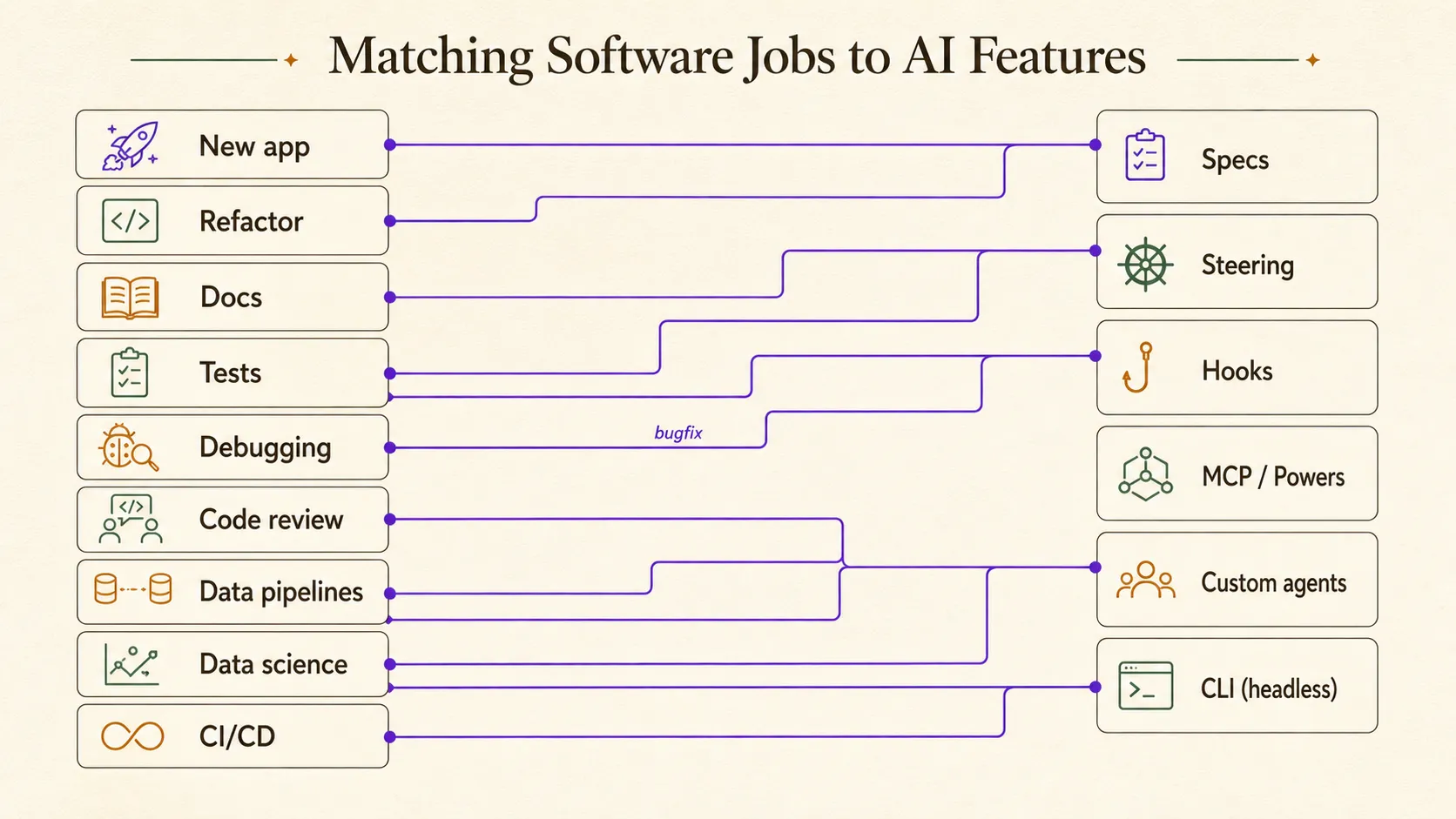
Nine real jobs, from building and refactoring to reviewing, data work, and headless CI, each matched to the Kiro feature that fits it best.
All levels 9 min read last reviewed 2026-09-04
◎ Learning objective
Match a real task to the right Kiro workflow (spec, steering, hook, custom agent, MCP, or headless CLI) and run it end to end.
By now you know what specs, steering, hooks, and agents are. This chapter answers the next question: which one do you reach for, and when? Nine everyday jobs, each in the same shape: the situation, the feature that fits, a small example flow, and one thing to watch out for.
1. Building a new app
You have an idea and an empty folder. The danger is building the wrong thing quickly, not typing speed.
This is the home turf of spec-driven development. Ask Kiro for a spec and it works through three files with you before any code exists: requirements.md (what, written as testable EARS Easy Approach to Requirements Syntax: structured requirement sentences like WHEN … THE SYSTEM SHALL … that can each become a test. lines), design.md (how), and tasks.md (in what steps). Feature specs offer three workflows (Requirements-First, Design-First, or Quick Plan) so you can match the ceremony to the stakes.
A typical flow:
- Describe the app in chat and ask Kiro to start a spec.
- Read
requirements.mdslowly and fix wrong assumptions there. Words are cheaper to change than code. - Optionally run the requirements analysis, which flags ambiguity, contradictions, and gaps before you approve.
- Approve
design.md, then executetasks.md. Kiro runs independent tasks concurrently in “waves”.
When is a spec overkill? Kiro’s own guidance is a clean split:
| Reach for a spec | Stay in vibe chat |
|---|---|
| Complex features | Exploration and experiments |
| Risky bug fixes | Quick prototypes |
| Work teammates must understand later | Throwaway scripts |
(Vibe chat here means freeform conversation where the agent codes immediately, with no written plan.)
2. Refactoring existing code
The code works, but its shape is wrong: a module grew too big, or a pattern needs replacing everywhere. Behavior must not change while the structure does.
Three features work together here. Steering files (your structure.md and tech.md, or a dedicated conventions file) tell the agent what the target style looks like, so refactored code lands in your patterns instead of generic ones. Supervised mode pauses the agent after each turn that edits files, letting you accept or reject every hunk A small block of changed lines in a diff: the unit you approve or reject during review. . Checkpoints are restore points you can roll back to if a session goes sideways.
A safe flow:
- Update steering with the target convention, and the why behind it. If you have never written one, start with your first steering file.
- Switch the chat to supervised mode.
- Ask for one slice: “Extract the payment logic from
orders.pyinto a service class. Only that, no other cleanup.” - Review each hunk, run the tests, commit. Then ask for the next slice.
3. Writing documentation
Docs always lag the code, because updating them is the chore everyone defers.
Kiro helps three ways: the agent reads code and drafts or updates docs on request; a steering file keeps the voice and structure consistent across sessions and teammates; and a hook can refresh docs automatically whenever the relevant code is saved. The step-by-step version is update docs on save.
A typical setup:
- Write a small steering file,
docs-style.md: who the reader is, the tone, and one or two structure rules. - Prompt: “Read
#folder src/apiand updatedocs/api.mdto match the current endpoints.” - Add a hook: when a file under
src/api/is saved, prompt the agent to update the matching section ofdocs/api.mdif the public behavior changed.
4. Writing tests
You have new code with no tests, or old code you are afraid to touch for exactly that reason.
Asking for tests works best with precise context: point at the module with #file rather than describing it. For features built through a spec, Kiro’s property-based testing Testing that checks a general rule holds across many generated inputs, instead of a few hand-picked examples. (added at GA) verifies that the implementation actually matches the spec. And because hook actions can be shell commands, a hook can run the matching tests on every save in a folder.
A typical flow:
- “
#file src/cart.ts, write unit tests: the happy path plus edge cases (empty cart, duplicate items, quantity zero).” - Read every assertion and check it against what the code should do.
- Add a hook: on save under
src/, run that module’s test command. Recipe: run tests on save.
5. Debugging
Something is broken: a stack trace in the terminal, red squiggles in the editor, a behavior nobody can explain.
Kiro offers two levels. For quick fixes, context providers feed the agent real error data without copy-paste: #problems pulls your editor’s current diagnostics, and #terminal pulls recent terminal output. For gnarly or risky bugs, start a bugfix spec: the structured analysis lands in bugfix.md (taking the place of requirements.md), followed by design and fix tasks you approve before anything changes.
A typical flow:
- Reproduce the failure in your terminal.
- Prompt: “
#terminal#problems: why does checkout return a 500 for empty carts?” - If the root cause is deep or the fix is risky, start a bugfix spec and read the analysis in
bugfix.mdbefore approving the fix.
6. Code review
Code arrives faster than it can be reviewed, especially once an agent is writing some of it.
Three tools fit. Supervised mode is built-in review of the agent’s own work: every file edit pauses for hunk-level accept or reject. A custom agent makes a strict reviewer: give it read-only tools and a critical prompt, and it physically cannot “fix” things while reviewing. The full walkthrough is build a read-only reviewer agent. And Kiro 0.9 added granular code review to the IDE, alongside custom subagents, while CLI v2.5.0 added subagent review loops on the terminal side; IDE 1.0 (June 2026) later added a capability-based permissions system that enforces a read-only reviewer’s limits at the tool-call level.
A typical flow:
- Create the persona:
/agent create reviewer -D "strict read-only code reviewer", with tools limited to reading. - Switch to it with
/agent swap. - Prompt: “Review
#git difffor correctness bugs and convention violations. Report findings. Do not fix anything.” - Swap back to your default agent and fix the findings one by one.
The separation matters for the same reason humans don’t review their own pull requests: a fresh persona with a critical prompt catches what the writer persona glossed over.
7. Data engineering workflows
You maintain pipelines: SQL transformations, scheduled jobs, maybe a dbt-style A project organized as layered SQL models with strict naming conventions, in the style popularized by the dbt tool. project. The work is convention-heavy, and mistakes fail quietly: a wrong join produces plausible numbers, not an error.
Three features carry the load. Steering is the anchor: a warehouse.md file encoding your layer rules, naming scheme, and partitioning habits means every generated model lands in your house style. MCP connects the agent to your data tools, so it inspects real schemas instead of guessing column names. And because schema changes are risky by nature, pipeline changes are good spec material.
Be deliberate with autoApprove on a database MCP server: auto-approving tools that can write to a production warehouse is how quiet disasters start. Approve read-only tools, and only those.
The full version of this section is Kiro for Data Engineers, which walks through a worked ingestion spec, the steering file, database access, and a data-safe .kiroignore.
8. Data science project support
Your project is notebooks, experiment runs, and half-written analysis docs: iterative work that resists tidy process.
To Kiro, notebooks and analysis scripts are just files in the repo: the agent can read them, refactor a sprawling notebook cell into a tested function, or draft the writeup from your results files. A steering file holding your metric definitions and data dictionary keeps every summary using the same terms. And when the work lives on a remote machine, the CLI brings the same agent, steering, hooks, and MCP into the terminal: SSH in, run kiro-cli, pull in results with /context add "experiments/**", and use !command for quick shell checks.
One honest limit: the agent drafts the writeup, but it cannot validate your science. Recompute the headline numbers yourself before anyone makes a decision on them.
Notebooks, dataset documentation, transformation tests, and the “kiro practitioner” learning path are covered properly in Kiro for Data Engineers.
9. CI/CD and headless automation
This one is advanced. Most readers can file it away for later.
The situation: you want Kiro to work with nobody at the keyboard (a nightly docs refresh, scheduled dependency triage, automated report drafts). The Kiro CLI supports headless Running a tool non-interactively, with no human present, typically inside a script or CI job. use with API-key authentication, which makes it usable inside CI/CD pipelines. Pair it with a custom agent restricted to exactly the tools the job needs.
The safe shape:
- Create an API key and store it in your CI system’s secret store, never in the repository.
- Define a narrowly scoped custom agent in
.kiro/agents/so it is versioned with the repo. - Have the CI job run the CLI headless with that agent, and make its output land as a pull request.
- Humans review that pull request exactly like any other.
The verified mechanics: the CI job sets the KIRO_API_KEY environment variable from your secret store and runs kiro-cli chat --no-interactive "…", pre-approving only narrow tool categories with --trust-tools (for example --trust-tools=read,grep for a review-only job). The step-by-step version is headless CLI in CI, and the full reference lives in the CLI Guide.
Frequently asked questions
When should I use a Kiro spec instead of just chatting?
Reach for a spec when the change is complex, when it is risky, or when a teammate will need to understand it later. Stay in conversational chat for exploration, quick prototypes, and throwaway scripts. If a prototype starts growing real scope, stop and formalise it into a spec rather than letting an unplanned feature sprawl.
What can Kiro actually be used for day to day?
Building new features from a written plan, refactoring under supervision, keeping documentation and tests fresh with hooks, debugging with bugfix specs and live error context, code review with a read-only agent, data pipeline and analysis work, and unattended jobs run headless in CI.
Which Kiro feature fits which job?
Specs for new features and risky bugfixes, steering for conventions that should apply every time, hooks for chores tied to events, custom agents for scoped roles such as a reviewer, MCP and powers for reaching external systems, and the CLI for remote machines and automation.
☰ Chapter summary
- New app or big feature: start a spec (requirements.md → design.md → tasks.md); keep vibe chat for throwaway exploration.
- Risky refactors: steering pins your conventions, supervised mode reviews changes hunk by hunk, checkpoints give you a way back.
- Docs and tests stay fresh with hooks that fire on file save; property-based testing checks the implementation against your spec.
- Debugging: bugfix specs put the root-cause analysis in bugfix.md; #problems and #terminal feed real errors to the agent without copy-paste.
- Code review: a read-only custom agent makes a strict reviewer; Kiro 0.9 added granular code review in the IDE.
- Data work: steering encodes warehouse conventions and metric definitions, MCP connects your data tools, and the CLI runs on remote machines.
- Advanced: the Kiro CLI runs headless in CI/CD with API-key auth. Restrict its tools and gate its output behind normal review.
All chapter summaries are collected on the revision page.
Related chapters
- Hands-onKiro for Data EngineersHow data practitioners use Kiro: specs for pipelines, steering for warehouse conventions, MCP for databases, and cheap models for bulk work.
- Core knowledgeCore ConceptsThe fourteen ideas that make up Kiro, each in one paragraph with a link to its full page, plus permissions, checkpoints, compaction, and a surface matrix.
- ConceptsSpecsA Kiro spec turns an idea into requirements.md, design.md, and tasks.md before code exists. How EARS notation, workflows, and task execution work.
- ConceptsHooksKiro hooks run an agent prompt or shell command when something happens. Trigger types, where hook files live, and how to scope them so they help.
- ReferenceCommon Mistakes & Don'tsThe traps that catch Kiro beginners and veterans alike: wrong assumptions, trust failures, security slips, and over-automation.