A free field guide · no signup · 69 chapters
Learn Kiro, calmly.
Kiro is Amazon's agentic AI development tool: an IDE, a terminal CLI, a web app, an iOS app, and Kiro Crew, an open-source always-on agent. This site is the free Kiro tutorial for beginners (yes, Kiro for dummies) and for engineers who want the details.
idea → requirements.md → design.md → tasks.md → working code
Continue where you left offKiro at a glance
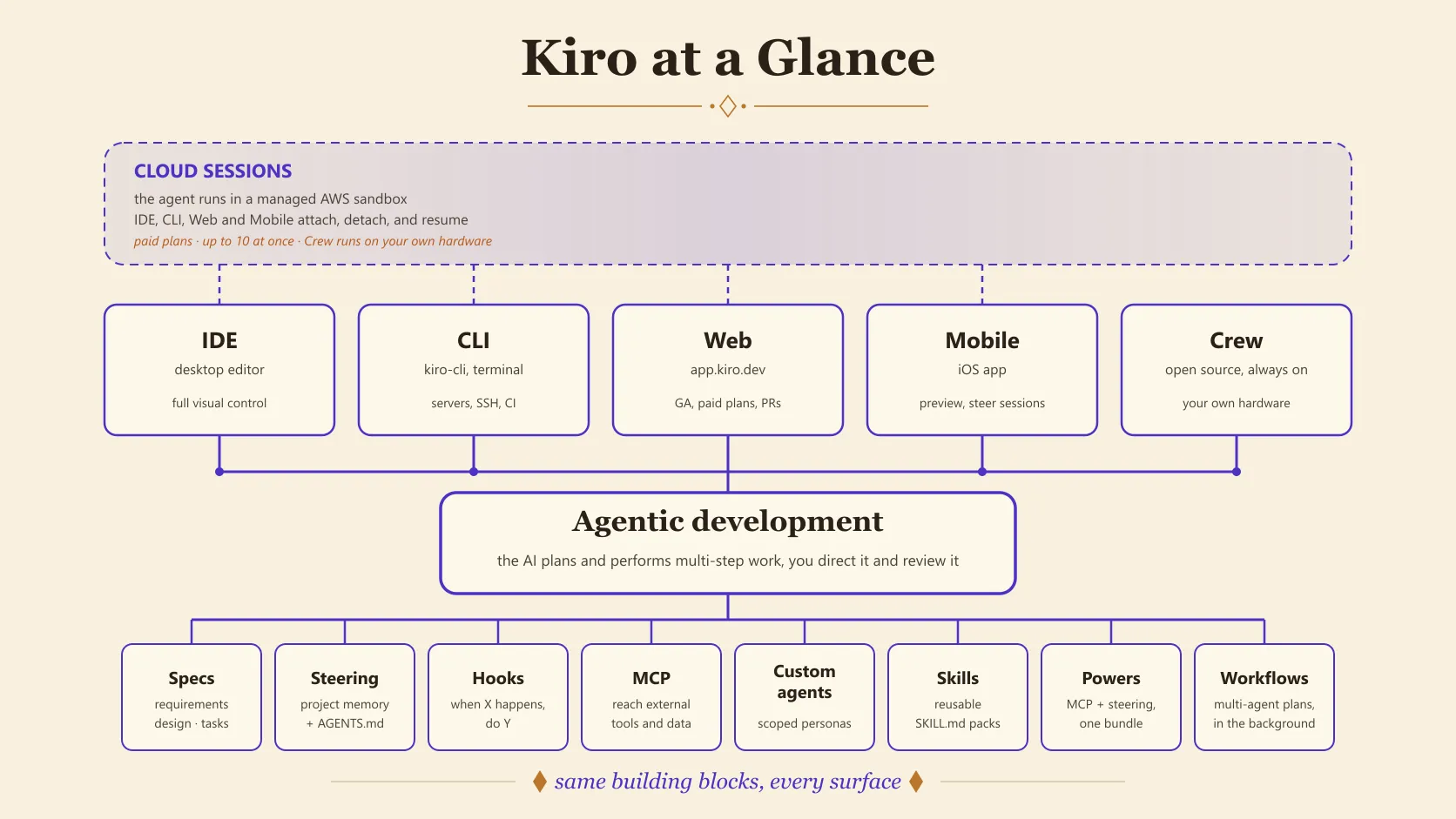
Fourteen ideas make up the whole system, plus Kiro Crew, the fifth surface. Each card links to its own plain-language chapter.
Agentic development
AI that plans and carries out multi-step work instead of suggesting one line at a time.
Specs
Features planned as requirements → design → tasks before any code.
Steering
Markdown rules that teach Kiro your project's conventions.
Memory
Context Kiro learns in one session and recalls in the next, so you stop repeating yourself.
Hooks
Automations that fire on events like saving a file.
MCP
A plug-in protocol connecting external tools and data sources.
IDE
A familiar VS Code-style editor with agents built in.
CLI
kiro-cli brings the same agents into your terminal.
Web
app.kiro.dev runs cloud agents against your repositories; generally available on paid plans.
Custom agents
Scoped assistants with their own tools, prompts, and limits.
Skills
Reusable instruction packs the agent loads when relevant.
Powers
One-click bundles of MCP + steering for a whole technology.
Workflows
Multi-step agent plans that run in the background, each step in its own fresh session.
Cloud sessions
Agent runs in an AWS sandbox that the IDE, CLI, Web, and mobile app can attach to and resume.
Kiro Crew
An open-source, always-on agent workspace that schedules work, remembers, and talks to you in Slack or the dashboard.
Start with the most-read pages
These six answer the questions readers arrive with most often.
Kiro Crew
The always-on agent on your own machine: install, run 24/7, stay safe.
Choosing a model
Every model, its multiplier, and what reasoning effort costs.
What's new in Kiro
Recent releases in plain English, and which ones need action.
Credit calculator
Your monthly credits for any model, and the cheapest plan.
Troubleshooting
The exact error messages, and what actually fixes them.
Recipes: first steering file
Ten minutes to a rule Kiro actually follows.
Who this site is for
Complete beginners
Never heard of Kiro? Start from zero. Every term is explained in plain language with analogies.
Start at chapter 1 →Software engineers
You know IDEs, Git, and CLIs. Skip the basics and go straight to concepts and advanced workflows.
Jump to core concepts →Data engineers & scientists
Use Kiro for pipelines, notebooks, documentation, tests, and automation around your data work.
Kiro for data work →Advanced users
Need a quick reference? Commands, files, workflows, and mistakes to avoid, all on one page.
Open the cheat sheet →Teams and automation
Run agents unattended: Kiro Web automations, cloud sessions, and Kiro Crew.
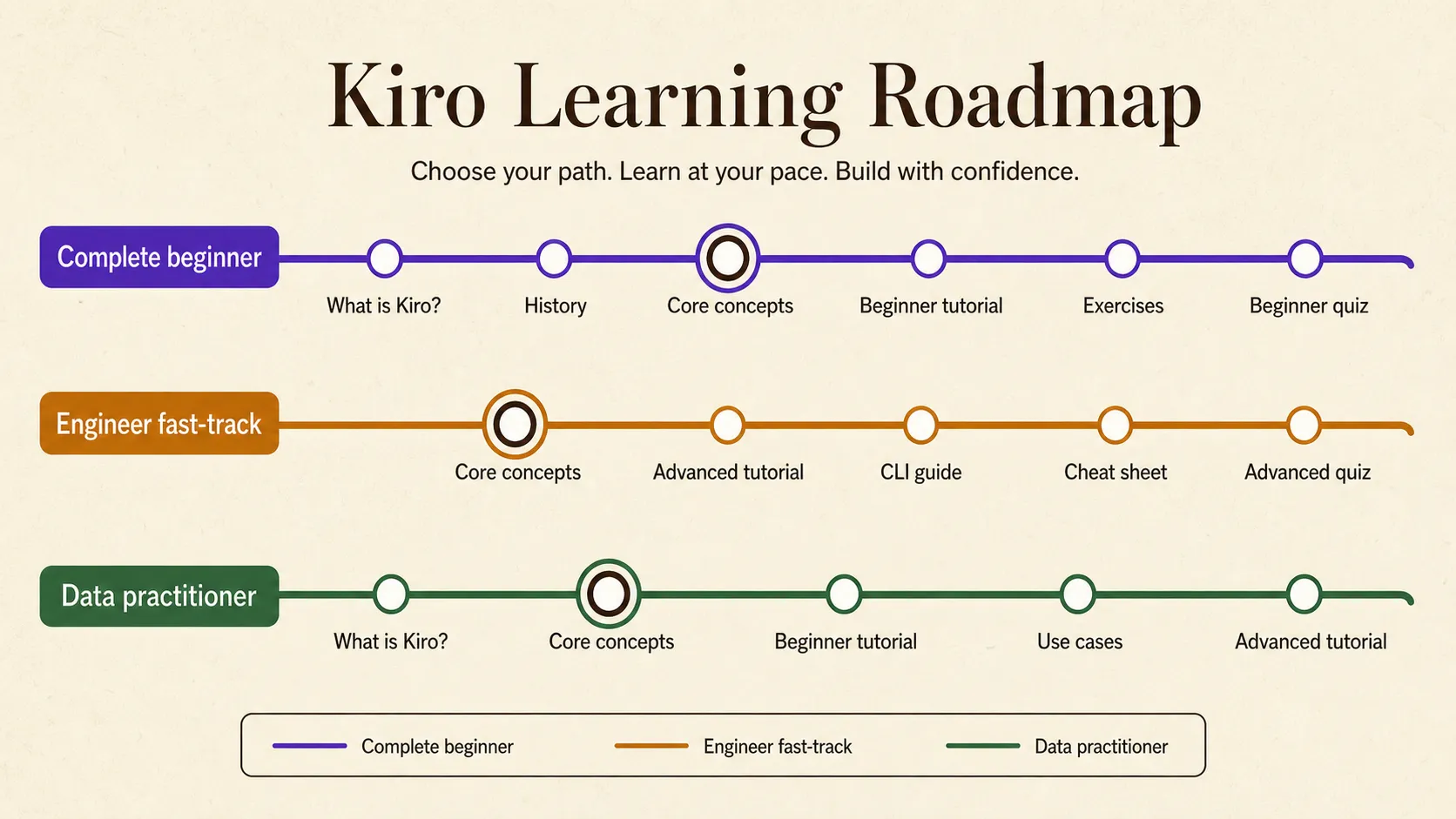
Meet Kiro Crew →Recommended learning paths
You don't need every chapter. Pick the path that matches where you're starting from. The site then follows it in the previous and next links at the foot of every chapter.
Path 1 · Complete beginner
From "what is this?" to your first working project.
Path 2 · Engineer fast-track
Skips the gentle ramp and goes straight to concepts, automation, and the terminal.
Path 3 · Data practitioner
Kiro for pipelines, analysis projects, docs, and tests.
Path 4 · Kiro Crew and automation
Agents that keep working when you close the laptop.