Concepts · Chapter 14 of 69
Specs
A Kiro spec turns an idea into requirements.md, design.md, and tasks.md before code exists. How EARS notation, workflows, and task execution work.
Beginner friendly 5 min read last reviewed 2026-10-04
◎ Learning objective
Create a spec for a real feature, write requirements in EARS notation, and decide when a spec beats a plain chat session.
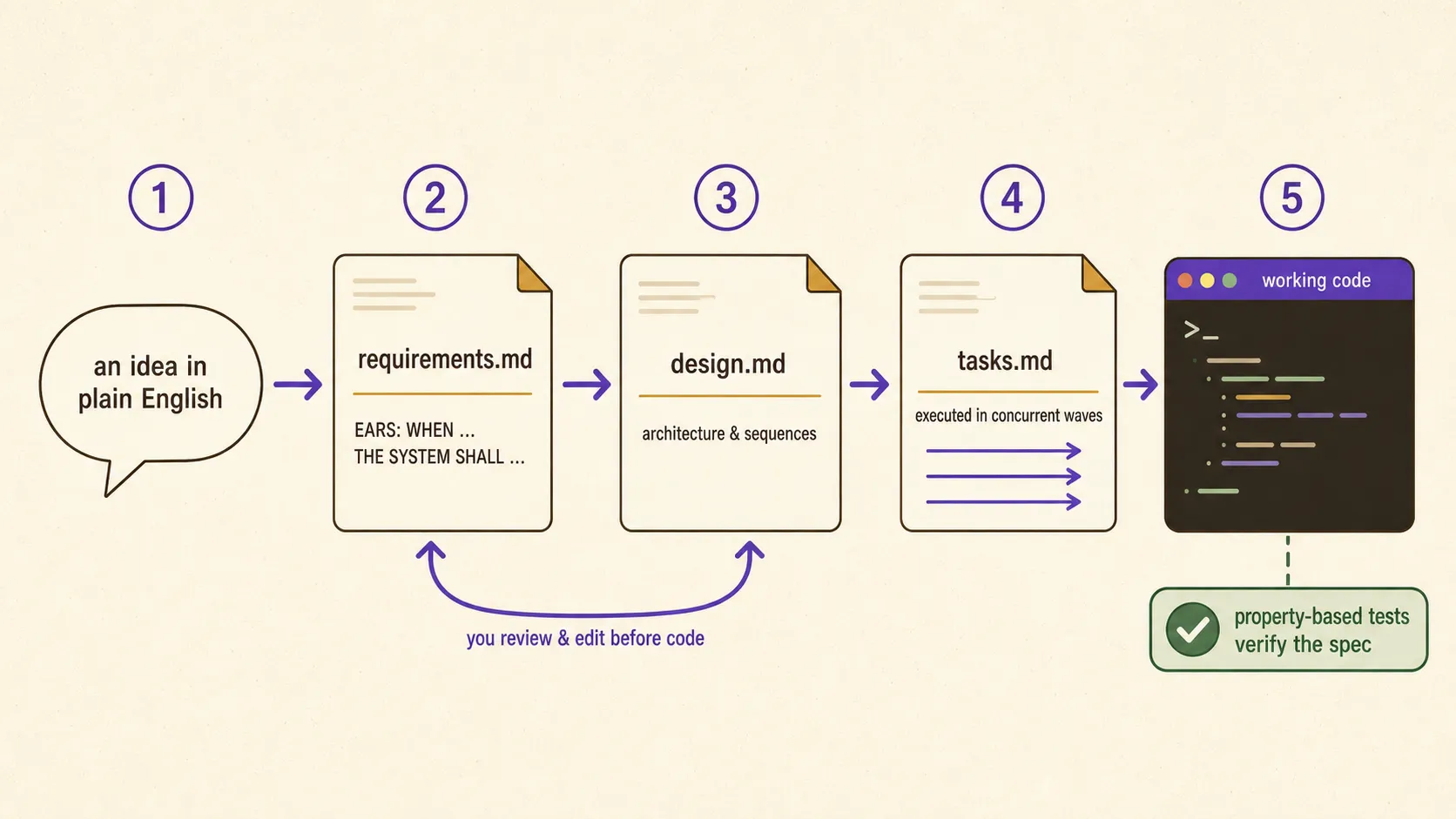
A Kiro spec is a written plan the agent builds with you before it builds anything else: what the feature must do, how it will be built, and the exact steps to build it. The three documents live in your repository, so the plan is reviewed, versioned, and still readable six months later.
What is a spec?
One spec produces a small folder of Markdown under .kiro/specs/. Three files carry the whole idea:
| File | Question it answers |
|---|---|
requirements.md | What should this do? User stories plus acceptance criteria |
design.md | How will we build it? Architecture, sequence diagrams, strategy |
tasks.md | In what steps? Discrete, trackable implementation tasks |
For defects there is a variant, the bugfix spec, where the analysis lands in bugfix.md instead of requirements.md.
Think of it as hiring an architect rather than shouting at a construction crew. Blueprints are cheap to change while they are still words and expensive to change once they are concrete. A requirement you rewrite in ten seconds becomes a two-hour refactor once the agent has written the code, the tests, and the docs around it.
Why it exists
The standard complaint about AI-generated code is that it works in the demo and falls apart later. The reason is usually not the model. It is that nobody wrote down what the code was supposed to do, so there is no reference to check it against, no way to tell a bug from a misunderstanding, and nothing for the next person to read.
Specs put that record next to the code. They also change where the thinking happens. In a chat session you discover a requirement halfway through implementation and the agent patches around it. In a spec you discover it in the requirements phase, when changing your mind costs one edit. Kiro can even run an optional requirements analysis that reads requirements.md looking for ambiguity, contradictions, and gaps before a single file is generated.
How it works
Creating one. In the IDE, use the Kiro panel or the Command Palette to create a new feature spec, then choose a workflow: Requirements-First, Design-First, or Quick Plan. In the CLI, /spec new starts a spec and, since v2.15.0, walks you through a guided description step before it generates requirements.
Writing requirements. Requirements use EARS notation Easy Approach to Requirements Syntax: a small set of fixed sentence patterns that make requirements testable. , which forces a wish into a shape a test can check:
WHEN the user submits the signup form with an empty email field
THE SYSTEM SHALL show the message "Email is required" and keep other fields filled

IF the email service is unreachable
THEN THE SYSTEM SHALL queue the welcome email and retry up to 3 times

WHILE an upload is in progress
THE SYSTEM SHALL disable the submit button
The three patterns cover the three cases people forget: WHEN for normal behavior, IF/THEN for error paths, WHILE for ongoing states. A requirements document with no IF/THEN lines is almost always unfinished, because software fails in more ways than it succeeds.
Reviewing before you approve. Each phase ends at a checkpoint you approve. In the CLI, pressing Ctrl+X at a spec phase checkpoint opens the phase document in place so you can read it and stage line comments. There is no /spec review command; the screen is keyboard-triggered, and since v2.19.0 it supports mouse scrolling and clicking.
Executing tasks. Once tasks.md is approved, the agent works through it. Independent tasks run concurrently in waves, so a plan with parallel work finishes faster than a strict list would. In CLI v2.20.0, /spec run opens a dedicated full-screen task execution view with real-time progress, and you pick the task scope before execution begins.
Verifying. Since general availability, property-based testing can check that the implementation actually satisfies the spec, rather than only checking that the tests someone wrote happen to pass.
Common mistakes
Skim-approving the requirements phase. Clicking through to get to the code throws away the entire point. The fix: read requirements.md as if a stranger wrote it, and ask one question per acceptance criterion: how would I test this?
Speccing everything. A one-line copy change does not need three documents. The fix: specs for complex features, risky bug fixes, and work that outlives your memory of it; plain chat for exploration and quick prototypes.
Writing requirements that describe the implementation. “THE SYSTEM SHALL use a Redis cache” is a design decision wearing a requirement’s clothes, and it removes the agent’s ability to propose something better. The fix: say what the user observes (“SHALL return search results within 300 ms for a cached query”), and let design.md choose the mechanism.
Letting the spec drift from the code. Requirements approved in March describing behavior changed in April are worse than no requirements. The fix: treat the spec files as part of the change. A hook that updates docs can help keep the surrounding documentation honest.
Where it fits
Specs sit on top of everything else. Steering supplies the standing context a spec does not repeat: your stack, your conventions, your architecture. Skills supply procedures the spec can rely on rather than re-explain. Hooks can fire before and after spec tasks. Custom agents can execute tasks with a narrower tool set than your default agent has.
By surface: specs work in the IDE, in the CLI (V3, with /spec new and /spec run), and in Kiro Web, which has run specs in the browser since June 2026. Because specs live in the repository, they travel automatically into cloud sessions, where project configuration comes from the repo rather than from your laptop.
Learn more
- Beginner Tutorial builds a first feature spec from scratch.
- Advanced Tutorial uses specs on a larger, multi-file change.
- Write a bugfix spec walks through the defect variant.
- Use Cases shows where spec-driven work pays off and where it does not.
- Cheat Sheet has the file names and EARS patterns in card form.
Frequently asked questions
What is a Kiro spec?
A spec is a structured plan that Kiro writes with you before it writes code. One spec produces Markdown files in your repository: requirements.md describing what the feature must do, design.md describing how it will be built, and tasks.md listing the implementation steps the agent then executes, running independent tasks in parallel waves.
What is EARS notation?
EARS stands for Easy Approach to Requirements Syntax. It turns wishes into testable statements using fixed patterns: WHEN a condition happens THE SYSTEM SHALL do something for normal behavior, IF an error occurs THEN THE SYSTEM SHALL handle it, and WHILE a state holds for ongoing constraints.
Where are Kiro specs stored?
Specs live in the .kiro/specs/ folder of your workspace, so they are committed with the code they describe. That is the point: the plan and the implementation stay in the same history and reviewers can read both.
When should I use a spec instead of just chatting?
Use a spec for complex features, risky bug fixes, and anything a teammate will need to understand months later. Use plain chat for exploration, quick prototypes, and questions. The spec's value is front-loaded thinking, so a task too small to think about is a task too small to spec.
What is a bugfix spec?
A bugfix spec is the variant of the spec workflow aimed at defects. The analysis lands in bugfix.md instead of requirements.md, and the rest of the flow works the same way: a design for the fix, then tasks the agent executes.
☰ Chapter summary
- A spec is a written plan Kiro builds with you: requirements.md, design.md, and tasks.md, stored in .kiro/specs/ inside your repository.
- Requirements use EARS notation: WHEN for normal behavior, IF/THEN for errors, WHILE for ongoing states.
- Feature specs offer Requirements-First, Design-First, and Quick Plan workflows; bugfix specs replace requirements.md with bugfix.md.
- An optional requirements analysis flags ambiguity, contradictions, and gaps before any code is written.
- Independent tasks execute concurrently in waves, and property-based testing checks that the code matches the spec.
- Use specs for complex features, risky bug fixes, and work teammates must understand later; use plain chat for exploration.
All chapter summaries are collected on the revision page.
Related chapters
- Core knowledgeCore ConceptsThe fourteen ideas that make up Kiro, each in one paragraph with a link to its full page, plus permissions, checkpoints, compaction, and a surface matrix.
- ConceptsAgentic DevelopmentAgentic development means the AI plans and performs multi-step work. How Kiro's agent loop, autonomy modes, permissions, and checkpoints work.
- ConceptsSteeringSteering files give Kiro permanent project knowledge. Where they live, the four inclusion modes, how scopes merge, and how AGENTS.md fits in.
- Hands-onBeginner TutorialInstall Kiro, have your first agent conversation, and build a tiny real project with a spec, step by step. No experience assumed.
- Hands-onAdvanced TutorialA production-shaped workflow that combines specs, steering, hooks, MCP, custom agents, and skills, written for engineers who already know the basics.